
What Is a Comanche County Court Docket
The docket is the official, dated record of court activity in a single case. Each line marks one event. A filing, a motion, a hearing, an order, a plea, or a ruling all earn their own entry. Read top to bottom, the docket tells the story of a case in order. It shows when the case opened, who the parties are, which judge is assigned, and what step comes next.
A docket is not the full case file. It is the index to that file. The entries name each document and event, but the documents themselves, such as petitions, motions, and signed orders, live in the case record kept by the Court Clerk. Think of the docket as the table of contents and the case file as the book.
In Comanche County, the dockets that appear online come from the District Court. That trial court handles civil, criminal, family, probate, small claims, protective order, traffic, and wildlife cases for the county. City courts run their own systems, so a Lawton or Cache municipal ticket will not show up on the same docket as a District Court case.
How to Search Comanche County Court Dockets Online
The main path to Comanche County dockets is the Oklahoma State Courts Network, known as OSCN. Its docket search page covers District Court cases statewide, and you narrow it to this county with one dropdown choice. The search is free, and no account is needed to view a docket. The county records request page even tells people to check OSCN for the case number and document titles before they ask for copies.
- Open the OSCN docket search page in your browser.
- In the County or Court field, pick Comanche County District Court instead of All Oklahoma Courts when you know the county.
- Enter what you have. Use the case number for a single case, or a last and first name to search by party.
- Add a date range or a case type if a name returns too many results.
- Open a result to read the full docket, including parties, events, counts, and document notes.
The search page itself shows the court selector at the top, with the name and case-number fields below it. You can see the live OSCN docket search form here.
That single page is the front door for nearly every Comanche County District Court docket. Once a result opens, the layout stays the same across case types, so the steps you learn for one case work for the next.
Note: OSCN posts docket text for free, but many of the underlying documents are marked for pickup at the Court Clerk's office rather than offered as downloads.
OSCN Docket Search Fields
The docket search form offers far more than a single name box. Knowing what each field does helps you cut a long result list down to the case you want. The table below lists the main fields on the OSCN search and how each one behaves for a Comanche County District Court lookup.
| Field Label | Type | Required | Notes |
|---|---|---|---|
| County or Court | Dropdown | Strongly advised | Choose Comanche County District Court to limit results to this county. |
| Case Number | Text | Optional | Examples by type include CF, CM, CJ, FD, PB, and TR. |
| Last Name / First Name / Middle Name | Text | Optional | Party search; middle name helps trim common names. |
| Born On or After / Born Before | Date | Optional | Date of birth range, entered as mm/dd/yyyy. |
| Party Type | Dropdown | Optional | Defendant, Plaintiff, Petitioner, Respondent, Attorney, Judge, and more. |
| District Court Case Type | Dropdown | Optional | Criminal Felony, Family and Domestic, Probate, Small Claims, Traffic, Wildlife, and others. |
| Cases Filed After / Before | Date | Optional | Limits results by the case filing date. |
| Cases Closed After / Before | Date | Optional | Limits results by the date a case closed. |
| Citation Number | Text | Traffic only | Searches the ticket number; District Court citations only, not municipal. |
Searching Comanche County Dockets by Number or Name
There are three common ways to reach a docket. The cleanest is the case number. If you already have it, type it in and go straight to the docket. This is also the path the county records request form expects, since it asks for the case number and the document title you want.
Search by party when you only know a person. Enter the last name, first name, and an optional middle name. A date-of-birth range and a party type sharpen the results. Party type matters because one name can appear in many roles. The same person might be a defendant in one case, a witness in another, and a petitioner in a third.
The third method is case type. The number prefix at the front of every Comanche County case number signals what kind of case it is, and you can match it to a case-type filter on the search form.
- CF and CM mark criminal felony and misdemeanor cases.
- FD covers family and domestic matters such as divorce and custody.
- PB and PROB mark probate and estate files.
- SC is a small claims case.
- TR is a District Court traffic case.
Note: a broad name search can return dozens of cases, so adding a birth date range or a filing-date window is the fastest way to find the right one.
Inside a Comanche County Docket Entry
Opening a case shows a structured page rather than a plain list. A public Comanche County felony case, CF-2024-1, gives a clear picture of the layout. Its header carries the case number, filed and closed dates, the assigned judge, and the parties. Below that, an events block, a counts block, a disposition block, and the dated docket itself each get their own section. The table below maps the main fields and what each one shows.
| Field | What It Shows |
|---|---|
| Case Number | The prefix marks the type, such as CF for a felony, and links to that case docket. |
| Case Style | The caption naming the parties; criminal cases read State of Oklahoma versus the defendant. |
| Filed / Closed Date | When the case opened and, if finished, when it closed. |
| Judge | The assigned District Court judge; the sample case listed Emmit Tayloe. |
| Parties | Defendant, the State of Oklahoma, the arresting agency such as Lawton Police, and the attorneys. |
| Events | Scheduled hearings and court activity, listed ahead of the docket. |
| Counts | Each charge as filed, the offense text, a statute link such as 21 O.S. 652, and the offense date. |
| Disposition | How each count ended, shown with violation and statute fields. |
| Docket | Dated entries with docket codes, descriptions, and party markers. |
| Document Note | Many lines read "Document Available at Court Clerk's Office." |
You can view the full CF-2024-1 docket on OSCN to see how these sections stack on one page.
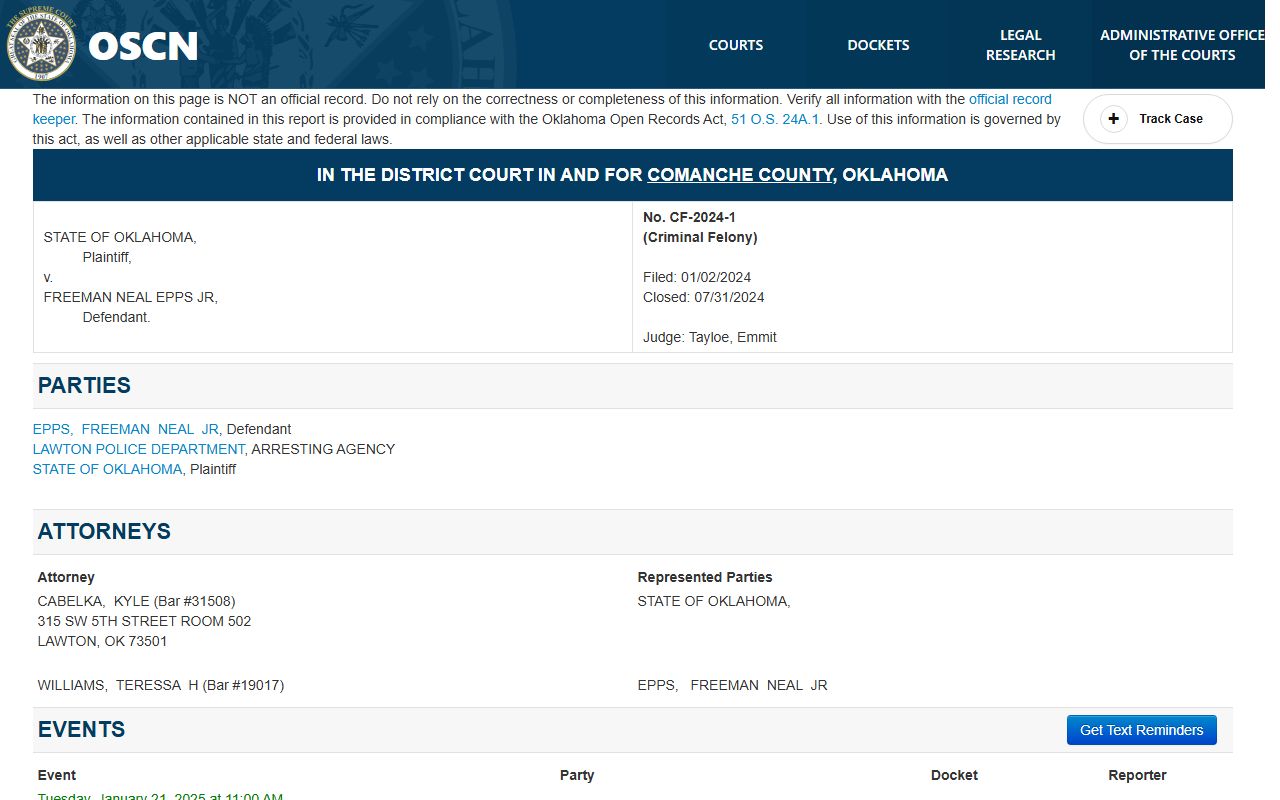
The counts section notes that the complete sentence detail appears within the court minute on the docket. For the full charge-by-charge story behind a case like this, the Comanche County criminal court records hold the charging document, pleas, and sentence.
Courts That Publish Comanche County Dockets
Not every court that serves the county posts to the same place. The District Court is the one whose dockets flow to OSCN. City courts in Lawton and Cache keep separate files and use their own online tools, so their tickets and ordinance cases never appear in an OSCN District Court search.
- Comanche County District Court posts civil, criminal, family, probate, small claims, protective order, traffic, and wildlife dockets to OSCN.
- Lawton Municipal Court keeps its own city ordinance and traffic dockets through a separate payment and search system.
- Cache Municipal Court handles city traffic, non-traffic misdemeanor, and parking cases on its own.
This split matters most for traffic. OSCN can search a District Court traffic citation by its ticket number, but the form states plainly that it searches District Court citations only and does not search municipal citations. A speeding ticket written under a Lawton city ordinance is a municipal case, so it must be looked up through that city court, not OSCN.
Note: a missed municipal court date can trigger a city warrant that never shows on the District Court docket, so check the right court for the ticket you actually received.
Comanche County Docket vs the Full Case Record
The docket and the case record are not the same thing, and the difference shapes how you use each one. The docket is a free, public list of what happened and when. The case record is the stack of actual documents behind those entries. You read the docket to track a case. You pull the case record when you need the words on the page.
| Docket | Full Case Record | |
|---|---|---|
| Format | List of dated entries | Full documents and filings |
| Access | Free online through OSCN | Often by request or in-person copy |
| Use | Track events and progress | Legal proof and case review |
On OSCN, this gap shows up in plain text. Many docket lines in a Comanche County case carry the note "Document Available at Court Clerk's Office." That note means the event is logged for free, but the document image is not posted online. To read or copy that paper, you go to the Court Clerk. The broader pool of Comanche County court records follows the same rule.
Common Comanche County Docket Terms
Dockets lean on short codes and legal words that can stall a first-time reader. A few terms turn up on almost every Comanche County docket, whatever the case type. The definitions below cover the ones most worth knowing before you scroll through a case.
- Docket
- The chronological list of every filing and event recorded in a court case.
- Count
- A single charge or claim within a case; one case can carry several counts.
- Disposition
- The outcome of a charge or case, such as a plea, a dismissal, or a judgment.
- Continuance
- A postponement that moves a hearing to a later date.
- Minute
- The court's note of what happened at a hearing; sentence detail often lives here.
- Bench warrant
- A warrant issued by the court, often after a person fails to appear.
Statute links sit beside many counts, pointing to the law cited for a charge. When a docket entry references a number like 21 O.S. 652, that is an Oklahoma statute section, and OSCN turns it into a link you can follow for the text.
Requesting Comanche County Docket Documents
When a docket entry shows a document you need but cannot download, the Court Clerk supplies the copy. Start on OSCN to capture the case number and the exact document title from the docket. Then use the county records request page and its form to ask for the paper. Requests go in person or by mail to the Court Clerk's office, and the form asks for the case number, the approximate year, the parties, and the document title.
Copies on a general request run one dollar for the first page and fifty cents for each page after. Mailed requests must include a money order or cashier's check made out to the Comanche County Court Clerk, since the office does not take personal checks or cash by mail. Certified copies, which carry the clerk's seal for official use, are available by checking the certification box on the form.
Attorneys and state agencies file new documents through Oklahoma's electronic court system rather than over the counter. The OSCN e-file portal handles those submissions, with a help desk for filers who hit a problem.
The e-file system is a filing tool, not a public docket viewer, so the general public still relies on OSCN to read a docket and on the Court Clerk to obtain copies. For a case with older filings, calling the office ahead is wise, because some records may not be ready the same day.
Note: keep the case number and document title from the docket handy, as the Court Clerk uses both to locate the file and quote a page count and cost.